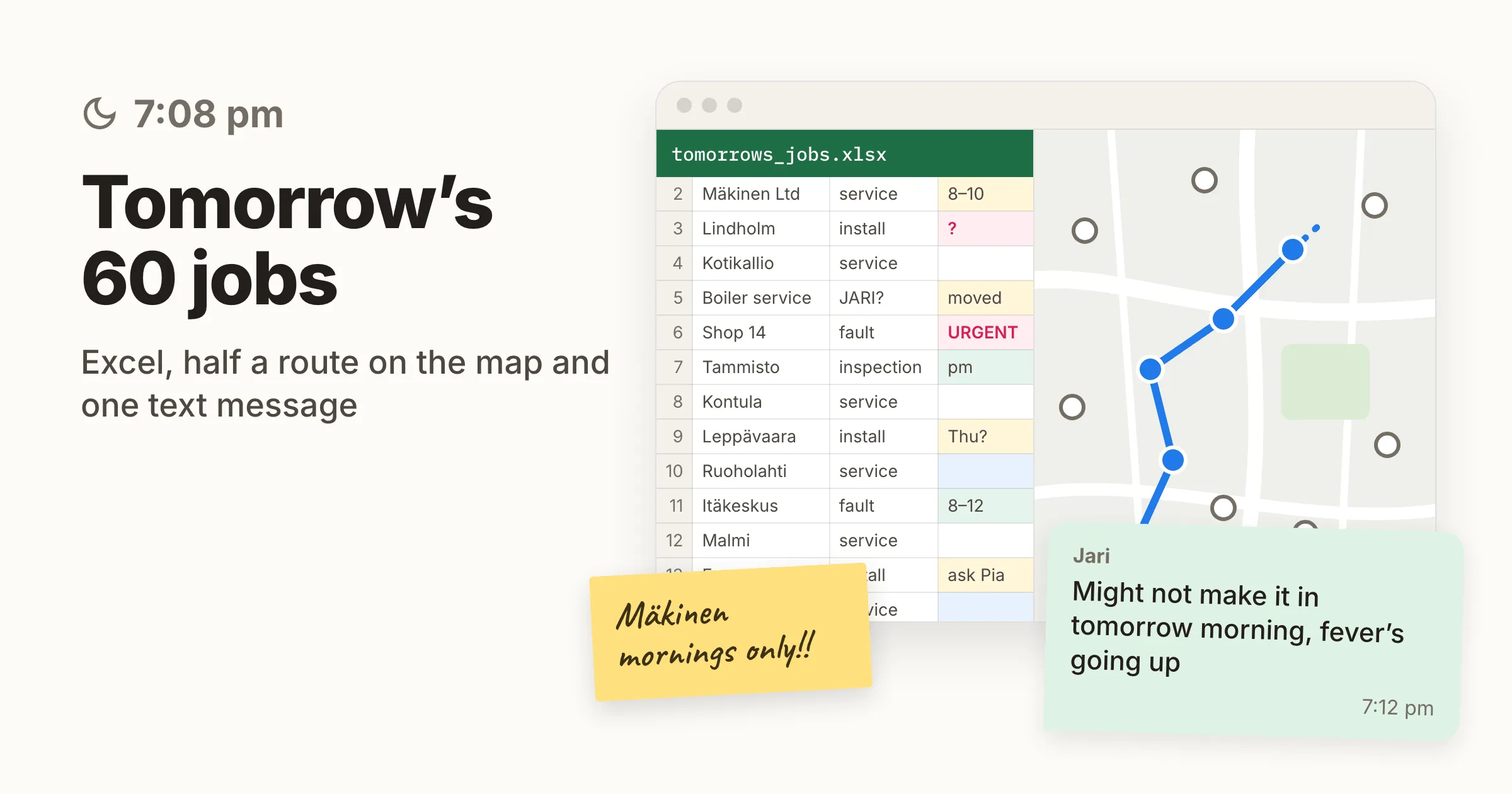
It’s just past seven in the evening. The service manager is still at the computer. Excel holds tomorrow’s 60 jobs, Google Maps shows half a route, and there’s a text from a technician who might not make it in tomorrow morning.
Plenty of service and cleaning companies know this evening well. A spreadsheet and a map work for a long time, until they don’t. This article looks at where that line is, what Google Maps and ChatGPT can actually do, and what route optimization changes.
Route optimization software works out who does which job and in what order, so that driving is kept to a minimum and every constraint is met.
Five signs your route planning has outgrown Excel
Few companies decide one morning that Excel is no longer enough. The signs build up slowly, and people get used to them.
- Tomorrow’s plan gets made in the evening, and it takes an hour or two every day.
- When someone calls in sick, half an hour goes on phone calls and moving jobs around.
- Two vans visit the same neighbourhood on the same day because the jobs came in through different channels.
- Who can do which job, and which customer only allows morning visits, lives in one person’s head. When that person is on holiday, the plans get worse.
- Technicians drive a lot, and nobody knows how much of it could be avoided.
If two or more sound familiar, the planner isn’t the problem. The task has simply grown too big to solve by hand.
Why can’t you find the best route by hand?
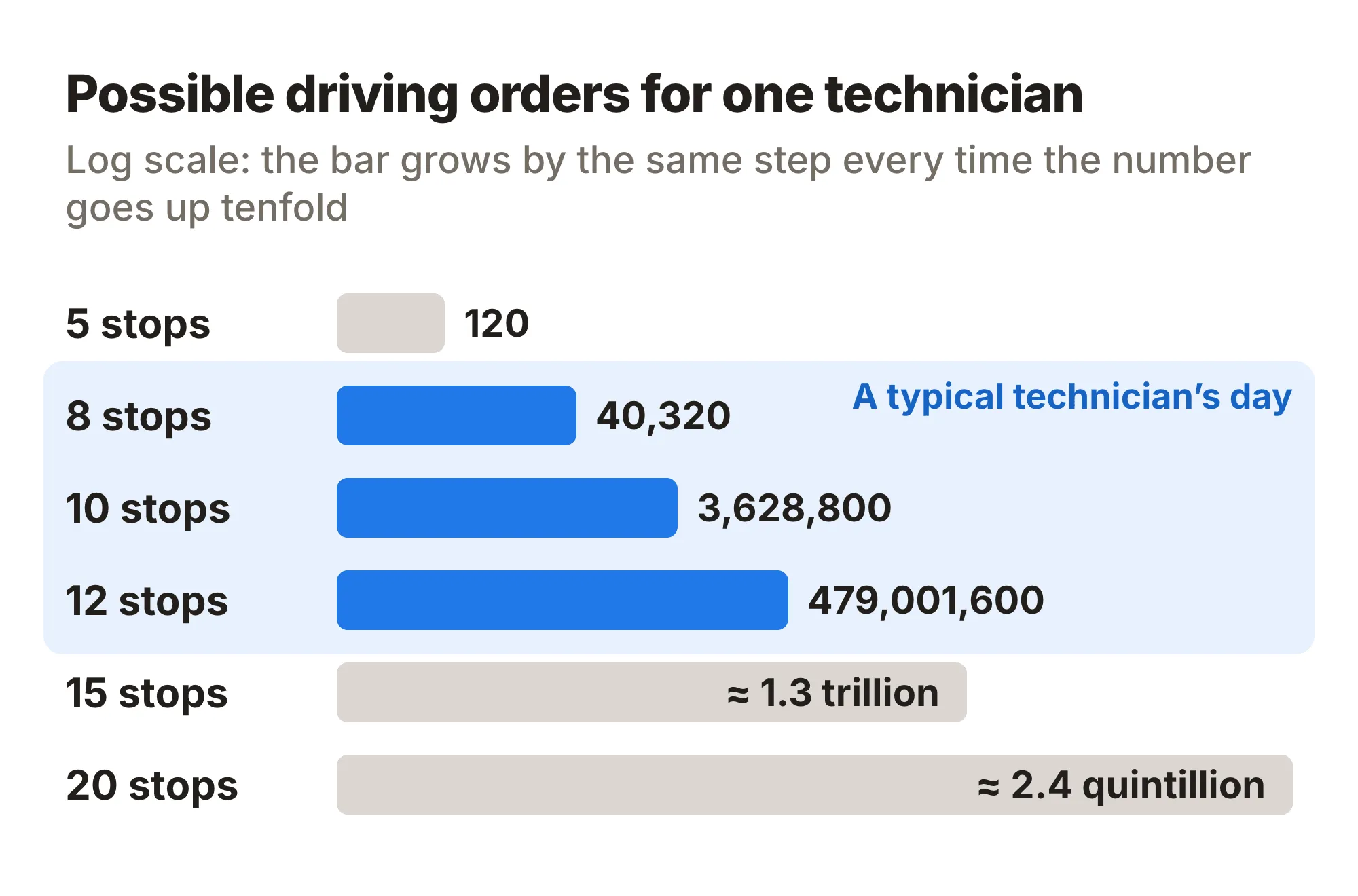
One technician with ten stops has 3,628,800 possible driving orders. With fifteen stops it’s about 1.3 trillion. And that’s one person’s day.
With several technicians you also have to decide who gets which job. Every constraint narrows the options: the customer’s time window, the technician’s skills, vehicle capacity, shift length, the agreed SLA. People handle this with rules of thumb, like splitting the city into areas and always driving to the nearest next stop. The plan works, but it’s rarely a good one.
Optimization software doesn’t try every combination. It rules out the bad ones systematically and compares what’s left. Allocator, for example, weighs 370 million options in under a minute.
Is Google Maps enough for routes with multiple stops?
For one van on a short run, yes. Google Maps is a navigation app: it finds the fastest road from one point to the next and knows the traffic. It doesn’t think about the order of your stops for you.
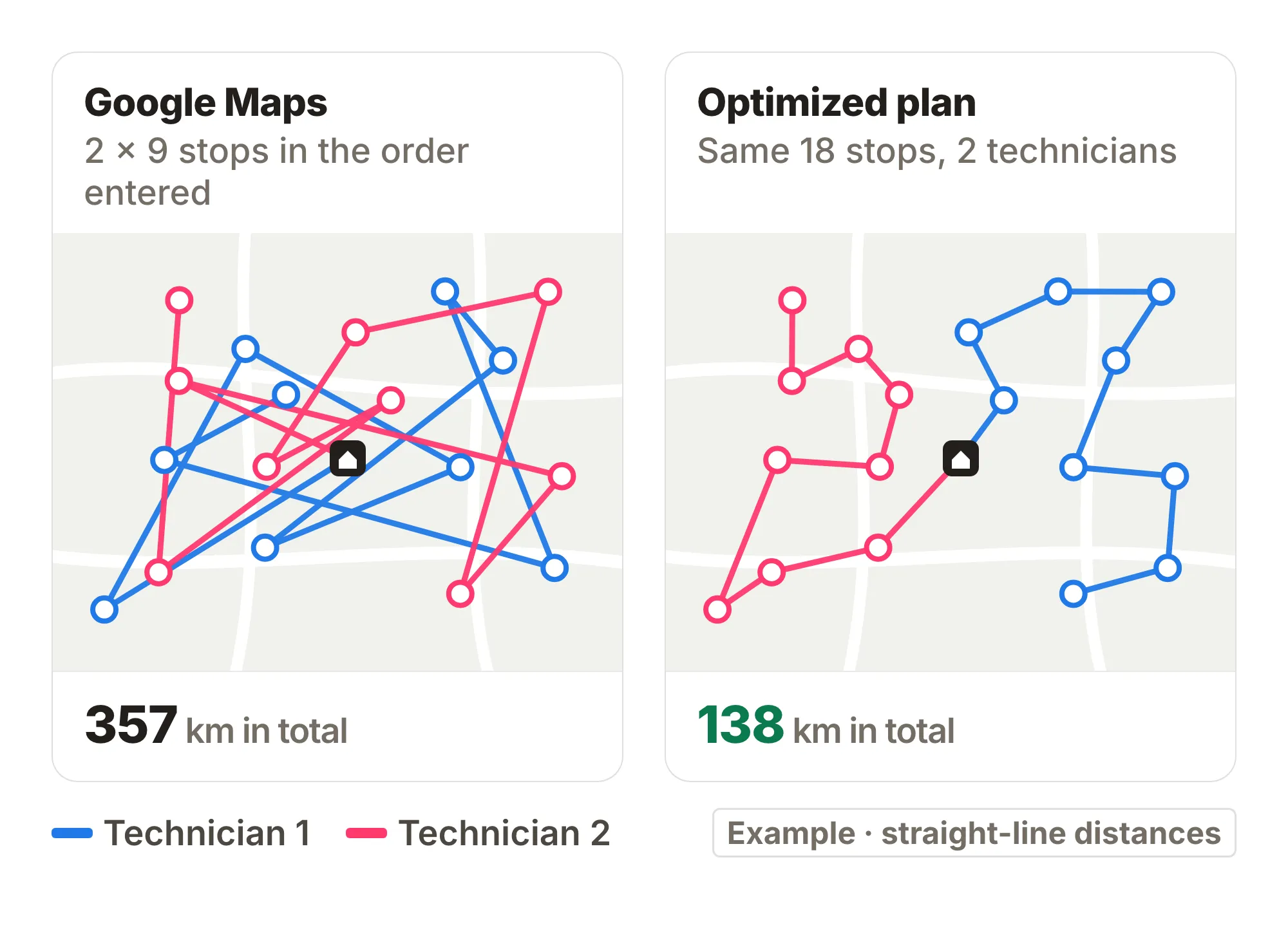
According to Google’s own help page, you can add up to nine stops to a route, including the final destination. The app drives them in the order you entered them. You can drag stops into a different order, but Google Maps won’t suggest the best one.
Field service needs more than that. Google Maps always plans one person’s route. It doesn’t decide which technician goes where, and it knows nothing about customer time windows, technician skills or shift lengths.
Google does sell a Route Optimization API for businesses, which assigns tasks across a whole fleet with time windows and shifts. But it’s a developer API. Someone has to build a user interface, a mobile app and integrations on top of it before a service manager can use it. The fact that Google sells fleet optimization as a separate product says a lot about what regular Google Maps is built for.
Can you plan routes with ChatGPT?
Not reliably. Lots of people have tried it: paste the job list into ChatGPT and ask for tomorrow’s routes. The answer looks good, with technicians, times and a sensible-looking order. Nobody knows whether the plan is good, or even workable.
A language model writes likely text. It doesn’t calculate routes or compare options, so it picks one plausible-looking answer out of trillions and has no idea how far it is from the best one. An optimization engine measures the kilometres, drive time and broken constraints of each option and chooses on that basis.
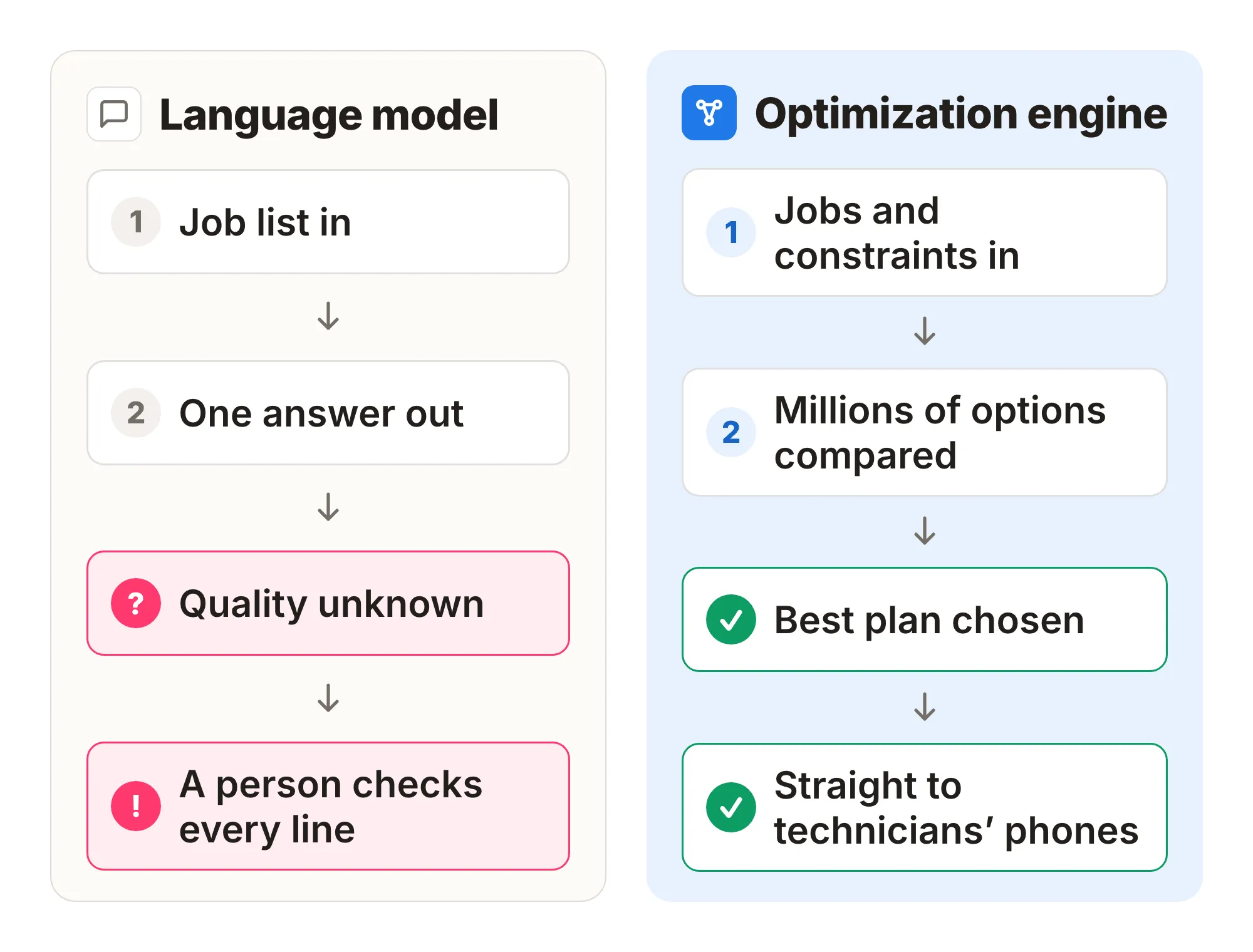
In practice the same problems keep coming up:
- Hard calculations don’t work yet. Optimizing dozens of stops under many constraints at once is too big a task for a language model.
- Drive times are guesses. The model has no road network and no traffic data.
- Constraints get dropped. In a long list, some time windows or skill requirements are ignored and the model doesn’t say so. Every line has to be checked by hand.
- The same job list gives a different plan each time.
- Every change means another round, and tokens cost money. When you plan every day and adjust during the day, the bill adds up fast.
- The plan stays in the chat window. It has to be copied by hand to technicians and into the ERP.
The job list also contains customer addresses and often personal data. Pasting it into a consumer chat service is a GDPR risk that many people don’t think about.
Language models are useful elsewhere, for example for sorting work orders that arrive by email. Calculating routes and assigning work needs an optimization engine built for that job.
Want to see what your own day would look like optimized? Start a free Allocator trial with your own jobs: 14 days free, no card needed. Jobs come in from a spreadsheet as a CSV file.
Excel, Google Maps, ChatGPT, ERP or route optimization?
Each tool has its place. The table shows where each one falls short when you have lots of jobs and people.
| Task | Excel | Google Maps | ChatGPT | ERP scheduling | Route optimization (Allocator) |
|---|---|---|---|---|---|
| Stop order | By hand | Order entered, max 9 stops | A guess | Usually by hand | Calculated |
| Assigning jobs to several people | By hand | No | A guess, unchecked | By hand in a calendar | Calculated |
| Time windows, skills, shifts | Remember yourself | No | Some get dropped | Depends on the system | All at once |
| Sick call mid-day | Phone round | No help | Start over | Move jobs by hand | New plan in minutes |
| Technician’s view | Printout or message | Own navigation | Copy by hand | Depends on the system | Mobile app |
Route optimization doesn’t replace your ERP. Allocator takes jobs from the ERP or a spreadsheet, builds the plan and sends it back.
Example: the same jobs with 9 shifts instead of 12
One of our customers planned a service day by hand and then with Allocator. The jobs were exactly the same.
| Metric | By hand | Optimized | Change |
|---|---|---|---|
| Shifts | 12 | 9 | −25.0% |
| Wasted time | 26.7 h | 6.9 h | −74.2% |
| Drive time | 13.8 h | 9.6 h | −30.4% |
| Distance driven | 613.2 km | 388.2 km | −36.7% |
| Driving cost per job | €37.16 | €23.53 | −36.7% |
One customer’s example figures for a single service day.
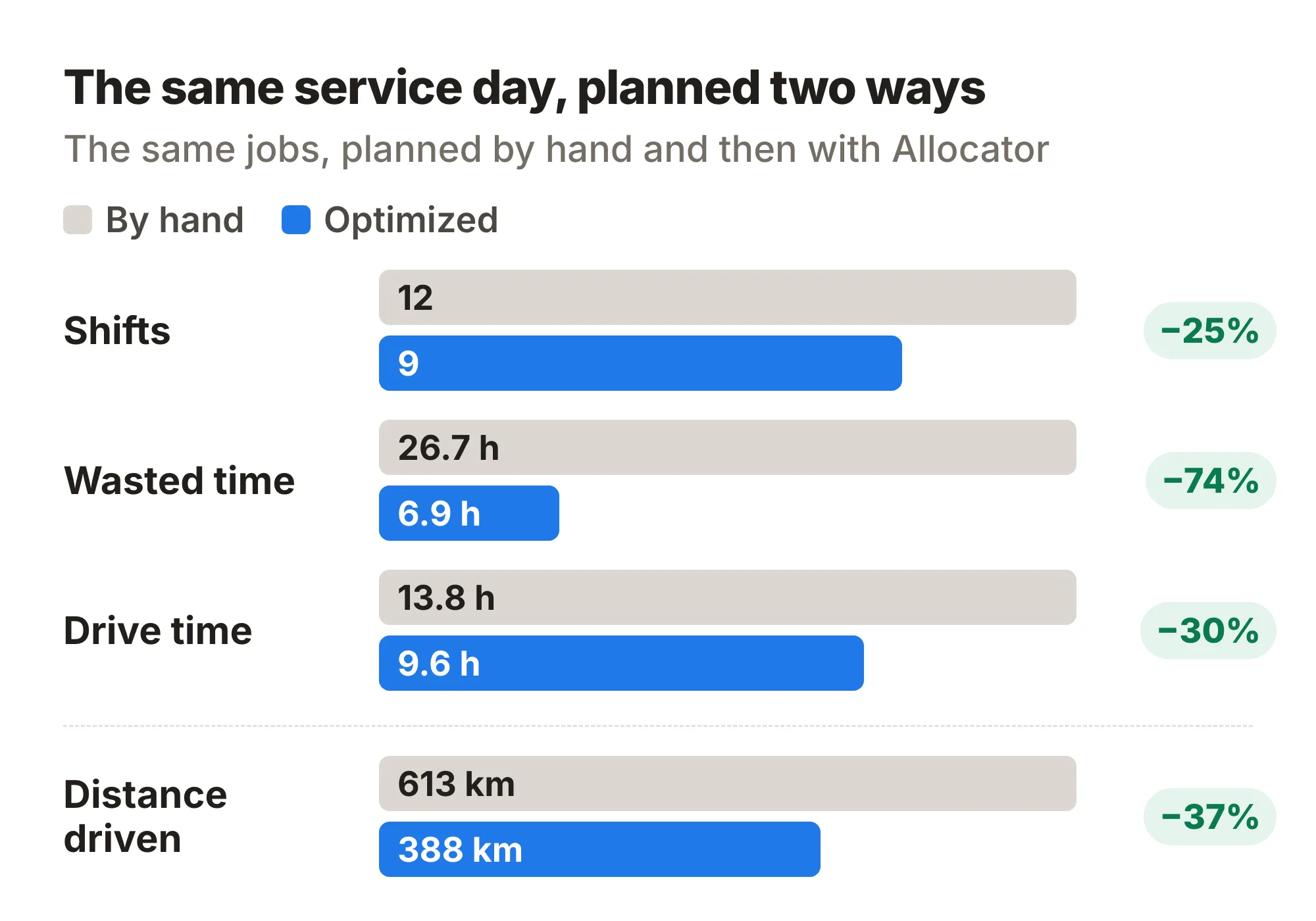
Those three freed-up shifts can be used in two ways. The same work gets done with a smaller team, or the same team takes on more work. For a growing company, the second is usually worth more.
For what the 225 kilometres saved (613 → 388 km) are worth in euros, see What does a kilometre of driving really cost?
AI frees up time for our supervisors. […] Our installers save time too, in the kilometres they no longer drive.
— Timo Kyllönen, Head of Installation, EcoUp
On average, Allocator customers drive 31% less, bill 18% more hours and spend half as much time planning. Get your own estimate with the savings calculator.
What should you look for in route optimization software?
Not every route planning tool optimizes the same thing. Many only sort the stops for one vehicle. For field service, check at least these:
- It assigns jobs across several people while respecting time windows, skills and shifts.
- It re-plans the day when someone calls in sick or a new job comes in mid-day.
- Technicians see their day on their phone and can mark jobs as done.
- Jobs come in from your ERP through an integration, or at least from a spreadsheet, and results flow back.
- Data is stored in the EEA.
The difference between sorting stops and planning the whole day is covered in Route optimization vs. mobile workforce optimization. For choosing a tool, there’s a separate guide.
Try it with your own jobs
The best way to find out whether your spreadsheet is still enough is to see your own day optimized. Start a free Allocator trial, import one day’s jobs from a spreadsheet as a CSV file and compare the plan with the one you made by hand.
If you’d rather see it with someone first, book a demo. Prices are public on the pricing page.
