When a worker calls in sick in the morning, their visits for the day have to be reassigned. The most important visits must still happen, the stand-in has to be someone who can do the work, and everyone else’s day should change only as much as it has to. By hand, this often takes thirty minutes to an hour. Allocator calculates a new plan in seconds, and the supervisor reviews and approves it.
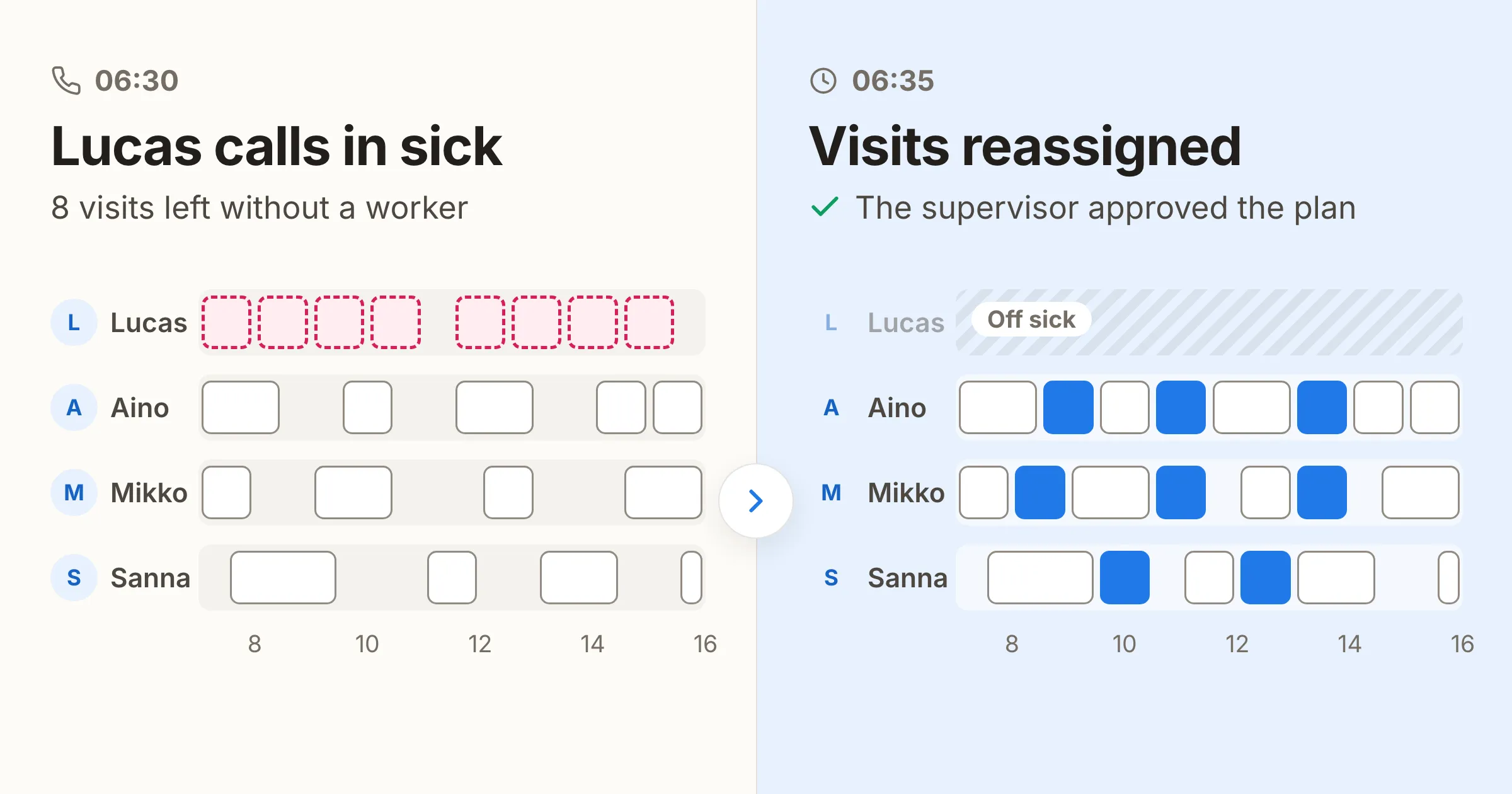
Monday, 06:30, the phone rings. Lucas, a property maintenance technician, is ill. He had eight visits booked for the day.
How much sick leave is there?
According to OECD Health Statistics, a full-time employee in Finland was off sick for 4.8 weeks on average in 2025. In Italy the figure was 0.6 weeks. The figures come from labour force survey answers, which the OECD scales up because people under-report absence in surveys. That is why they are higher than the Statistics Finland figures below. The gap between countries also reflects how absence is measured and how sick pay is arranged, so the figures do not tell you where people are ill most often.
According to the Statistics Finland Labour Force Survey (in Finnish), a little over seven per cent of Finnish employees were off sick in a given week in 2022, for part of the week or all of it. Most absences were shorter than a full working week: about 36 per cent lasted the whole week. Absences of one or two days were common. Short absences are the hardest to plan for.
And in cleaning?
In the same Statistics Finland review, cleaning work was one of the ten large occupational groups with the most sick days per employee in 2022. Those groups had at least 18 days each, against an average of 13 days for all employees and four for managers. In cleaning, supervisors therefore have to arrange cover more often than in many other kinds of work.
What has to be decided after a sick call
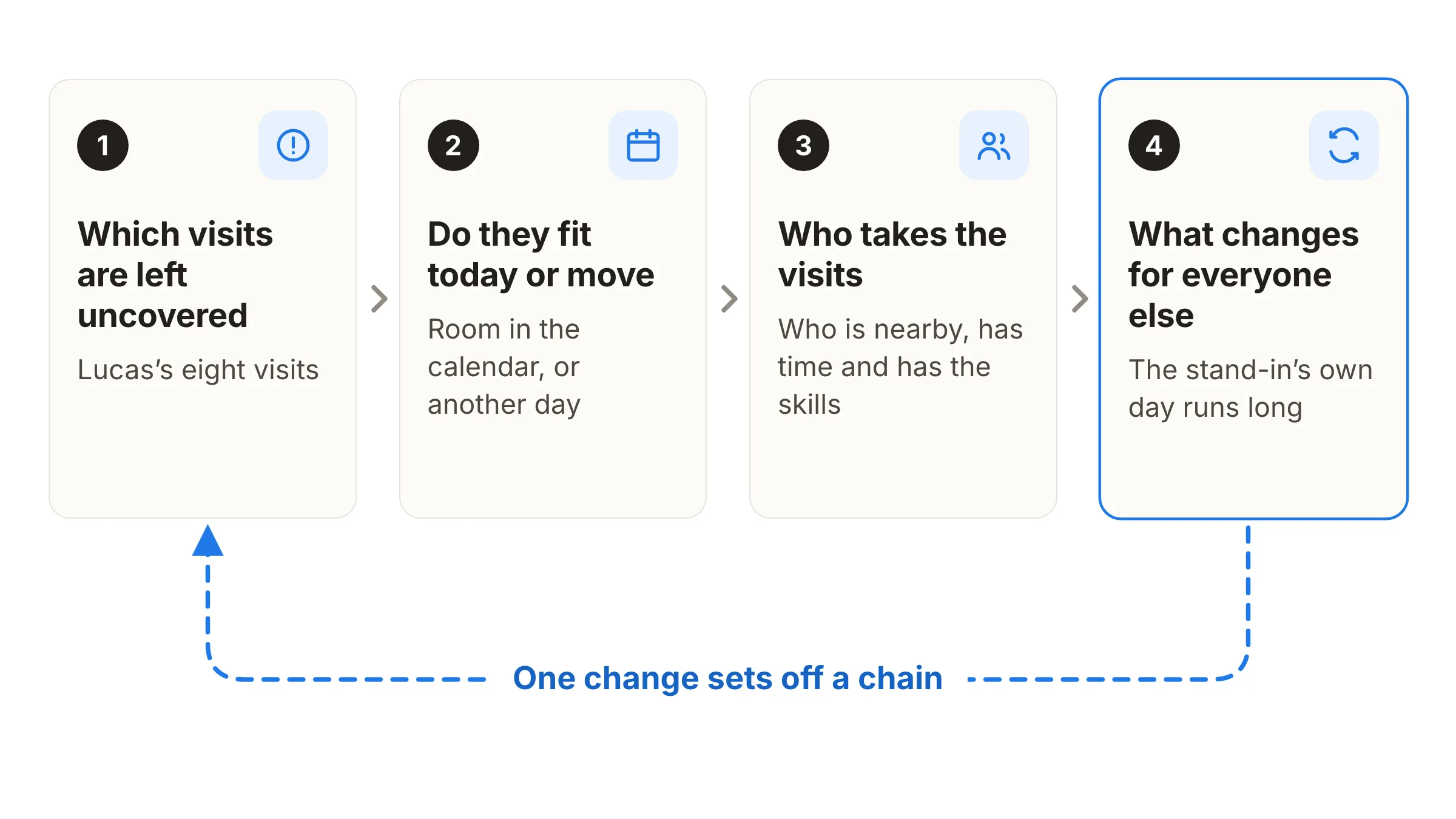
One sick call means four decisions, in this order:
- Which of the day’s visits are left without a worker.
- Whether they fit into the calendars of today’s workers, and if not, which ones can move to another day.
- Who takes the visits that must happen today: who is nearby, who has room and who has the skills.
- What this changes in everyone else’s day.
The fourth decision is the easiest to forget. When one stand-in gets three extra visits, their own day runs long, and someone else has to take their last visit. One change sets off a chain.
Why fixing it by hand takes so long
The supervisor’s plan usually lives partly in their head, partly in Excel and partly in a calendar. When the sick call comes in, they start phoning. The search for a stand-in goes one worker at a time, and every answer changes the next question: one can make it, but not until eleven; another is already on the far side of town.
Meanwhile the day carries on. A customer wants to move their visit, a fault report is waiting and someone else calls in sick. The Field work, reallocated whitepaper describes exactly this kind of Monday morning: a fix turns up, but it takes thirty minutes to an hour, and the same thing happens several times a week.
The customers whose visits move also have to be told, and those calls stretch the morning further still.
Who takes the sick worker’s visits?
Picking a stand-in looks easy until you look closely at the candidates. The nearest worker may not know the job. The one who knows it may have a full day. And the one who has the time and the skills may never have been to the site.
Allocator weighs all of these at once: location, free time, qualifications and whether the worker has been to the site before. A tricky fault-finding job goes to the person who can do it, and a routine visit to whoever is nearby. Knowing the site matters because a familiar worker knows where to pick up the keys and how to switch off the alarm, and usually gets the visit done faster. When arranging cover, Allocator favours a worker who has been to the site. There is more on this in Route optimization vs. mobile workforce optimization.
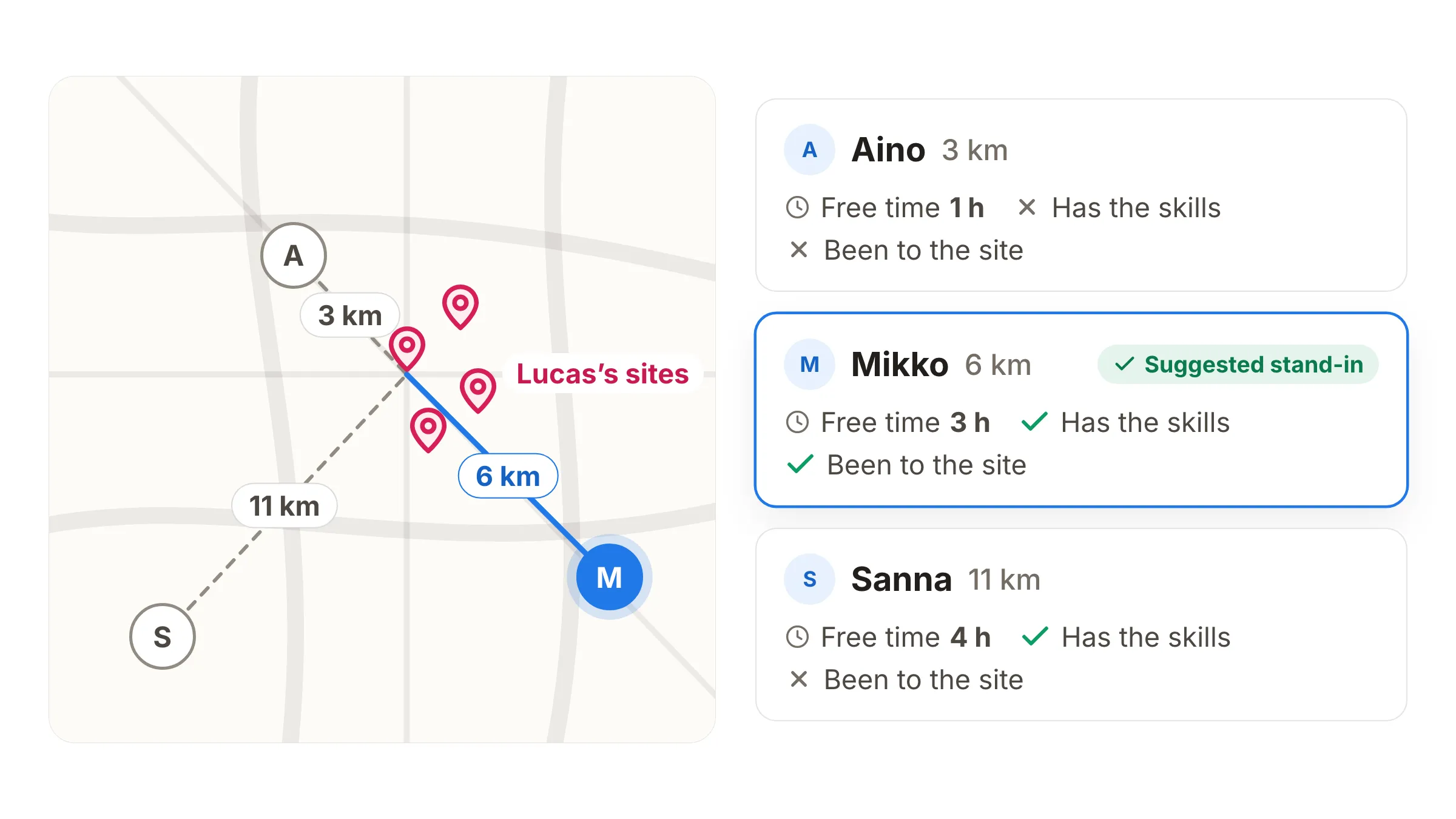
If one stand-in is not enough, the visits can be shared between several workers.
When do visits need to move to another day?
Visits do not need to move if they fit into the calendars of the workers who are available. Moving them only comes into play when they do not fit. Then someone has to decide which visits happen today, and that is best not left to whoever happens to answer the phone first.
Sites can be given a priority in advance. When so many people are off that not every visit can be done, Allocator suggests moving the visits without a priority first and leaves the priority sites alone. Examples are healthcare premises, food production sites and sites under an SLA. If a visit’s timing is flexible, Allocator suggests a new time for it in the following days, inside the customer’s own time window.
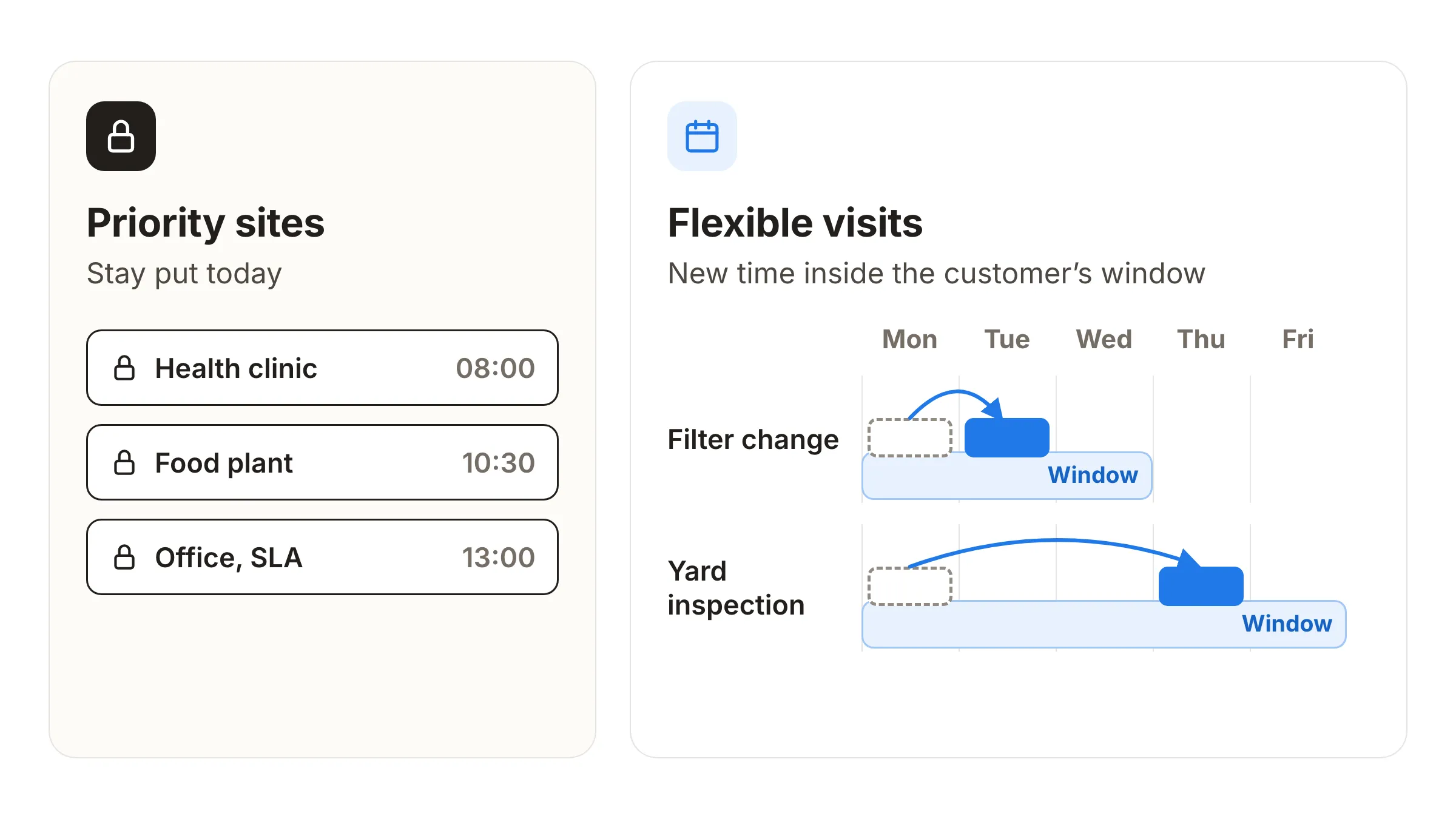
In maintenance and field service, priority can mean how urgent a job is or what it is worth to the business. The most important visits get done on time even when not everything can be. More by industry: cleaning services and field service.
When there are not enough workers for everything, Allocator shows straight away what will be left undone and what is worth moving.
The same morning with Allocator
This is how the same morning goes with Allocator:
- 06:30 The phone rings. Lucas is ill, and his visits for the day have to be reassigned.
- 06:31 The supervisor marks Lucas absent in Allocator. One click is enough.
- 06:32 Allocator recalculates the day. Lucas’s visits go to suitable workers so that routes stay sensible and the agreed time windows hold.
- 06:34 The supervisor looks through the new plan and approves it.
- 06:35 Allocator publishes the plan. Every worker sees their day on their phone.
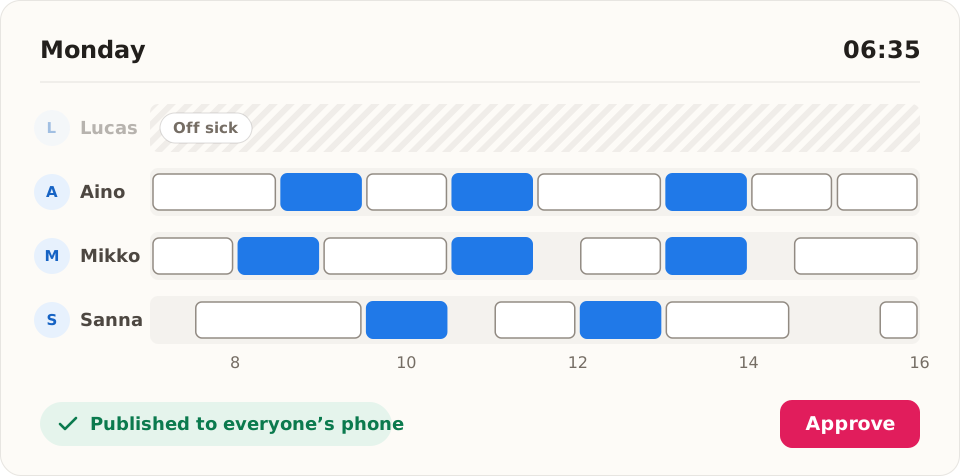
The supervisor can approve the suggestion, pick another option or move visits themselves. If a second sick call comes in the same morning, it is handled the same way.
Handling a sick call by hand and with Allocator
| Topic | By hand | With Allocator |
|---|---|---|
| How long it takes | Often thirty minutes to an hour | Calculated in seconds; five minutes to approval in the example |
| Finding a stand-in | Phoning round one worker at a time | A suggestion based on location, free time, qualifications and site familiarity |
| Everyone else’s day | The change becomes clear when someone calls | Before approval you can see who takes which visit, and other days change only as much as needed |
| A second sick call | Start again from scratch | Handled separately as soon as it is entered |
| Prioritising | Decided on the spot, often in a rush | Priority sites stay; flexible visits get a suggested new time in the following days, inside the time window |
What it takes to get started
The suggestions are only as good as the data behind them. To choose a stand-in and protect the priority sites, Allocator needs the workers’ qualifications and working hours, the sites’ time windows and priorities, and a record of who has been where. These are entered once, and after that they carry into every plan.
You can bring the data into Allocator as an Excel file or move it over through an integration with your ERP, FSM or TMS system. Excel gets you started without an integration; with an integration, the data flows between the systems on its own.
If a sick call stops your whole morning, let’s look together at how the same morning would go with Allocator.
